

Most bloggers don’t quit because they “run out of ideas.” They quit because content creation never ends. Research, outlines, drafts, images, search engine optimization, formatting, publishing, promotion, email capture, then doing it again next week for more blog posts.
Good blogging tools don’t just make things faster. Productivity tools reduce the number of decisions you have to make each day, so you can publish consistently without your brain feeling like a browser with 42 open tabs.
- Start With the Tools That Turn Ideas Into Drafts You Can Actually Publish
- Keyword Research Tools That Tell You What to Fix (Instead of Vibes)
- Publishing, Promotion, and Email Capture Without Adding More Tabs
- RightBlogger Pricing and What You Actually Get (January 2026 Snapshot)
- Choose the plan that fits your workflow
- Conclusion
Start With the Tools That Turn Ideas Into Drafts You Can Actually Publish

Among blogging tools, if you only fix one problem in your workflow, fix this one: getting from “topic” to “draft.” That jump is where most niche sites stall.
A solid writing stack usually has three parts:
- Idea capture (notes app, voice memo, simple doc)
- Draft production (AI writing tools for content creation that help you go from blank page to structure)
- Editorial pass (readability, clarity, accuracy, your voice; perhaps a WordPress plugin)
This is where RightBlogger fits. Based on its product descriptions and plan details, it’s built for bloggers who want long-form posts fast (including 2,000+ word articles for content marketing), without spending half their time fiddling with prompts. It also pushes hard on consistency with automated blogging and scheduling, so you’re not relying solely on motivation. Drafts produced here head straight to WordPress.
Two features matter more than they sound on paper:
- Automated blogging + scheduling: the point isn’t “set it and forget it” forever. It’s giving yourself a steady publishing rhythm while you focus on real improvements (better examples, better images, better headlines).
- Style controls (MyTone): if you’ve tested AI writing tools, you know the default voice can feel generic. A tone system that tries to match how you write is useful, even if you still edit.
One caution, because it’s honest: AI can help you draft and structure, but it doesn’t remove responsibility. If you publish claims (health, money, legal, stats) in your blog posts, you still need to verify them. Tools speed up writing, not truth.
Keyword Research Tools That Tell You What to Fix (Instead of Vibes)

A lot of keyword research and SEO advice sounds confident, right up until you try it. Then you’re left wondering, “What do I change first?”
The most practical seo tools do two things:
- Show what’s missing with keyword research tools (topics, terms, subtopics, structure).
- Make updates repeatable (so you can improve older posts without rewriting from scratch).
RightBlogger’s “Smart SEO Reports” are positioned as exactly that: quick feedback on missing keywords, structure changes, and clear steps to improve a post. Pair them with Google Search Console for even deeper insights. That’s valuable if you’re sitting on older content that’s close to driving organic traffic but not quite there. As an example, I used it to optimize this post. Below is the before and after optimization.
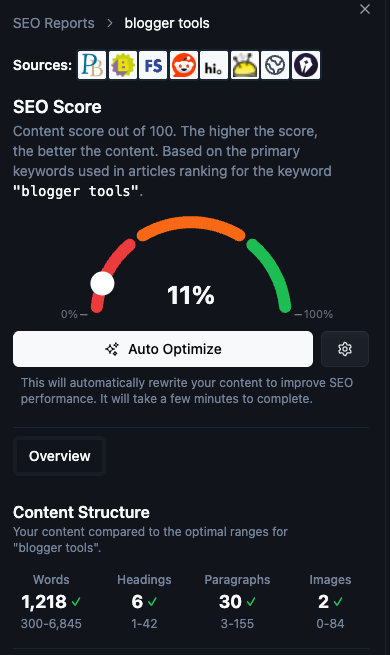
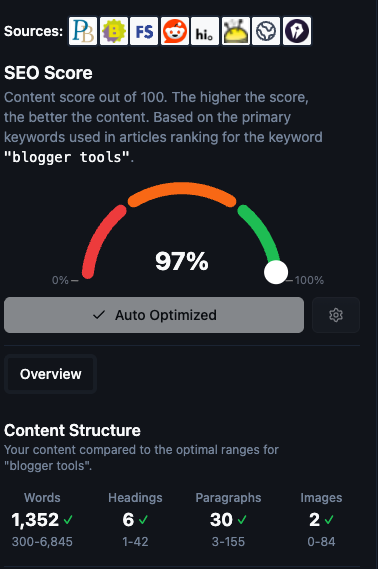
Still, keep your expectations grounded. No tool can promise rankings, because Google’s systems are not fully transparent, and results depend on competition, links, domain authority, and intent match. What tools can do is help you avoid obvious problems, like:
- Headings that don’t match what the reader searched for
- Thin sections where competitors cover details you skipped
- Pages that wander instead of answering one clear question
If you want a simple rhythm that works with almost any set of seo tools for search engine optimization, use this:
- Write a new post.
- Publish it cleanly.
- Revisit it in 30 to 60 days with a report, then tighten the weak spots.
That loop builds a library that improves over time, not a pile of posts you never touch again.
Publishing, Promotion, and Email Capture Without Adding More Tabs
Writing is only half the job. The other half is social media promotion to drive blog traffic, getting the post in front of people, then giving them a reason to come back.
RightBlogger emphasizes direct publishing integrations (WordPress, Webflow, Ghost, and others listed in its materials) and automation that schedules posts for you. If you’ve ever drafted in one tool, copied into WordPress, fixed formatting, added images with graphic design tweaks, and then scheduled, you know how many tiny steps can quietly eat an hour.
Another practical angle is repurposing. RightBlogger promotes turning YouTube videos into blog posts, which can work well when you already have a clear script and message. The key is to edit the output so it reads like a real article, not a transcript with headings.
Then there’s email capture. You don’t need a complicated funnel to start email marketing. You need one good offer and one clean way to present it.
Two options that tend to work:
- Embedded tools (calculators, quizzes, simple generators) that feel useful, not pushy
- Pop-ups that behave (timed well, targeted, easy to close)
If you’re using Blocksy, this guide on smart triggers and display rules is a good example of the “behave” approach: create non-intrusive pop-ups using the Blocksy WordPress plugin.
For extra reach, share your content via social media and Pinterest marketing. The goal is simple: respect people’s attention and still ask for their email to build your email marketing list.
RightBlogger Pricing and What You Actually Get (January 2026 Snapshot)
When choosing blogging tools, it often comes down to one thing: can you stick with it? Price matters (similar to monthly hosting services costs), but so does whether the tool removes friction or adds it.
From the plan details provided, RightBlogger includes a free option (2,000 free words monthly) and paid tiers with a 30-day money-back guarantee, plus monetization benefits from advanced features. It also highlights “unlimited” usage on higher plans, which matters if you publish frequently.
Here’s a clean summary based on the plan information provided:
Choose the plan that fits your workflow
Simple pricing for bloggers, creators, and teams.
A few plan details that stand out because they affect day-to-day use:
- Pro includes autoblogging + scheduling and more SEO reports per month than Lite.
- Higher tiers include more projects, tone styles, automations, and embedded tools.
- The free tier is a low-risk way to see if the workflow fits your writing style.
One grounded way to decide: pick the plan based on your publishing pace and blog growth goals. If you publish occasionally, you don’t need the heaviest automation. If you publish weekly (or manage multiple sites while prioritizing website speed), scheduling and bulk creation stop being “nice to have.”
Want to see a tool in action? Check out this one you can try for free, right here and right now!
Conclusion
The best blogging tools do something simple: they keep you moving when you’d normally stall. Drafting support, clear SEO feedback, one-click publishing, and honest email capture can turn blogging from a grind into a system.
If you’re choosing just one tool to test first, start with the one with the highest friction. For most people, that’s the blank page. Tools like RightBlogger are worth a look when you want help drafting long posts and keeping a steady schedule, as long as you still do the final verification and editing. Once your writing system is established, explore advanced strategies such as link building, next-step tools like Google Analytics for performance monitoring, and email outreach as part of a complete growth system.
For sustained blog growth, prioritize driving organic traffic and boosting blog traffic. What part of blogging slows you down most right now, writing, SEO updates, publishing, or building organic traffic?
Creator’s Toolbox
80+ AI-Powered Blogging Tools
Here’s every tool inside RightBlogger, built to help you create content faster and more effectively. New tools are added all the time.
See the Tools


As a blogger who has spent way too many late nights staring at a blinking cursor, I am approaching this with so much appreciation. For a long time, “workflow” just meant “chaos,” but seeing your specific stack from keyword research to AI-driven automation, gives me a clear vision of how I can actually scale without losing my mind. Thank you oh so much 🙂
Thanks for leaving remarks, Leah. I appreciate it!
I have used many tools in my content creation process. So were great others, not so much. I have found a winner here, and I intend to spread the word as a content creator who actually uses the product. The blogging tools inside RightBlogger were created by content creators for content creators. That alone makes a huge difference, because they understand the struggle we go through and are simplifying the creation process for all who use it.
Thanks for reading,
Michael
Gone are the days of trying to come up with content on your own and paying someone else to do it for you. When I started online marketing, none of this stuff was available. We made a website from scratch and literally wrote our own content. AI truly is the way of the future. Thank you for adding what seems to be another good AI tool option.
The old days are indeed fading fast. AI is the new norm, but it will always require human input to make it unique is how I look at it now and will in the future.
I thank you for taking the time to leave your remarks. Have a Great Day.
Michael