- Pinterest Teaser Pins: What They Are and How to Use Them for Clicks
- What a Pinterest teaser Pin is (and what it is not)
- Why teaser Pins work so well on Pinterest (and when they do not)
- How to create teaser Pins that get clicks (without looking spammy)
- Try This With Your Next Pin
- Frequently Asked Questions About Pinterest Teaser Pins
Pinterest Teaser Pins: What They Are and How to Use Them for Clicks
If you’ve spent any time marketing on Pinterest, you’ve probably seen Pins that make you think, “Wait, how did they do that?” That’s the basic idea behind Pinterest teaser Pins.
Teaser Pins aren’t an official Pinterest format. Pinterest doesn’t offer a button that says “Create a Teaser Pin.” It’s an unofficial term creators use for a specific style of image, video, and copy that shows just enough to spark curiosity, then nudges someone to click through (or swipe) for the full answer.
Pinterest is a search and discovery platform, not a post-today, forget-tomorrow app. A good teaser can keep showing up in searches weeks or months later. In this guide, you’ll learn what teaser Pins are, when they work best, and how to create them without sliding into clickbait.
What a Pinterest teaser Pin is (and what it is not)
A Pinterest teaser Pin is a creative approach, not a labeled Pin type. You can build a teaser using common formats like:
- Static image Pins (the classic tall pin with a headline)
- Video Pins (short clips that preview the result or process)
- Carousel Pins (multi-image Pins that invite swipes, often up to 5 images)
What makes it a “teaser” is the intent. You’re giving a preview that makes the next step feel worth it. That next step is usually an outbound click to a blog post, product page, portfolio page, email signup, or free download. In other words, teaser Pins are for creators who care about traffic and conversions, not just saves.
This matters because Pinterest is full of people saving ideas for later. Saves are great, but if your business goal is site visits (and sales), your Pins need a reason to click now.
The simple definition: a preview that makes the next step feel worth it
Teaser Pins work best when they show the outcome and hold back the “how.” Think of them like a movie trailer. You get the vibe and the promise, but you still need to watch the full thing to get the story.
Common teaser angles include:
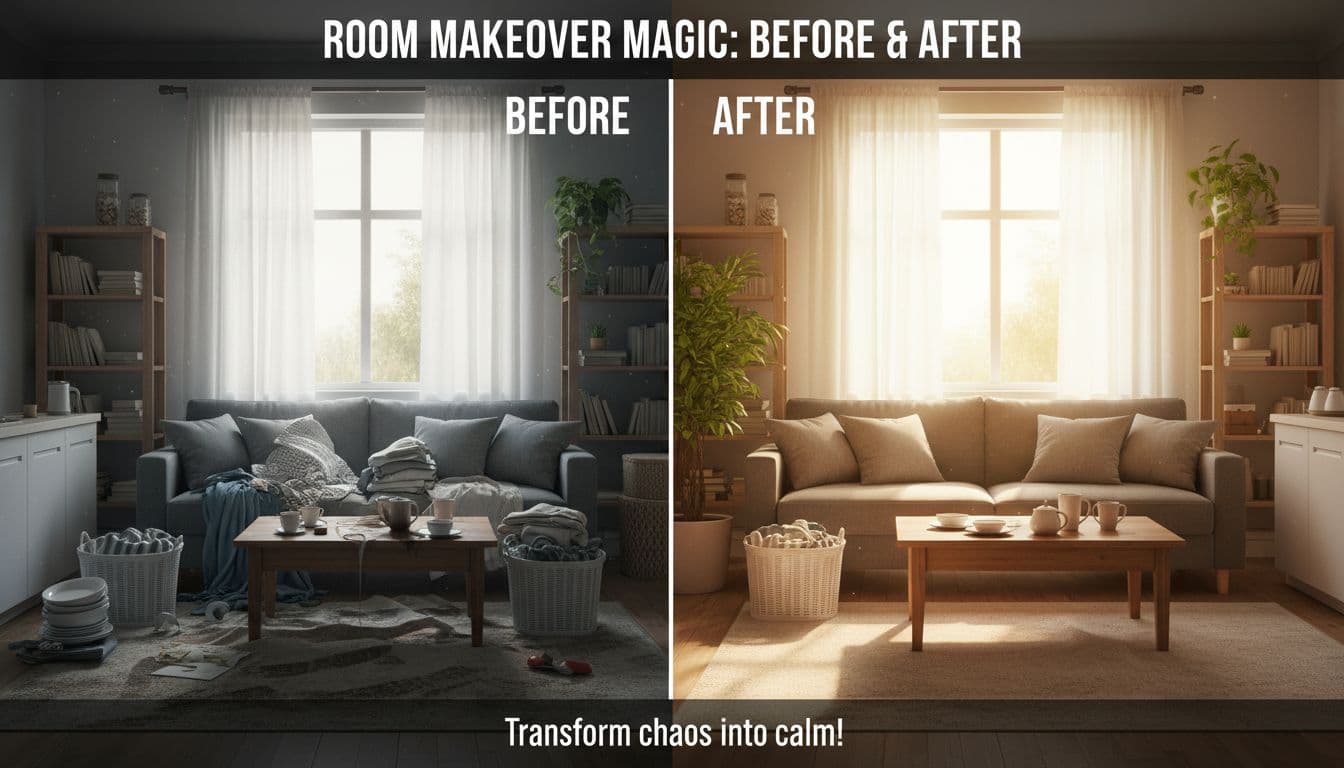
- Before and after: Show the transformation, then promise the steps.
- 1 tip out of 10: Give a single quick win, tease the full list.
- Finished project first: Show the end result, then point to the tutorial.
- Quick proof: A tiny result screenshot or mini case study that leads to details.
A practical copy trick is to put the benefit right up front, because Pinterest often shows only the first line or two of your description in the feed. Example:
“Make your living room look pulled together in one weekend, see the 7-step checklist inside.”
How teaser Pins differ from “give-it-all-away” Pins
“Give-it-all-away” Pins include full infographics, complete checklists, and step-by-step graphics that contain the whole answer. They can earn a lot of saves because people want to reference them later.
The downside is simple: if the Pin already delivered everything, there’s no reason to click.
Teaser Pins trade some saveability for curiosity and clickthroughs. That trade is usually worth it when your main goal is website traffic, product sales, bookings, or email signups.
The line you don’t want to cross is bait-and-switch. If your Pin promises “the full steps,” the landing page needs to actually deliver those steps. A teaser should feel like a fair preview, not a trick.
Why teaser Pins work so well on Pinterest (and when they do not)
Teaser Pins work on Pinterest because they match why people come to the platform in the first place: ideas, solutions, and products. People aren’t only looking for entertainment. They’re planning a kitchen refresh, searching for a capsule wardrobe, or trying to fix a stubborn dinner routine.
Pinterest’s own reporting and industry summaries have also pointed out how discovery-driven the platform is. One widely cited stat is that most top searches are unbranded (often shared as 96 percent), which means people are looking for “small patio ideas,” not “Brand X patio set.” Another frequently shared figure is that a large share of weekly users buy after seeing a brand’s Pin (often shared as 85 percent). The takeaway is not the exact number, it’s the behavior: Pinterest users tend to be open to new options, and a clear promise plus a clear next step fits that mindset.
Teasers don’t work as well when the audience only needs a single quick answer and won’t benefit from more detail. If your landing page won’t add real value beyond the Pin, the click won’t happen.
They match how people use Pinterest: search first, decide later
Pinterest behaves like a visual search engine. Teaser Pins can keep getting found if you help Pinterest understand what the Pin is about.
Use keywords naturally in the places Pinterest and Google can read:
- Board names and board descriptions
- Pin title and Pin description
- On-image text (short headline overlays)
- Image alt text on your site
- Even your image file name on your site (small detail, but helpful)
Keep it simple: aim for 2 to 3 main phrases per Pin, not a pile of tags. If the Pin is about “easy pantry organization,” don’t wander into “minimalist interior design” unless the content truly matches.
They create strong engagement signals without needing daily posting
Pinterest rewards content that gets interaction. Swipes on carousel Pins and longer watch time on video Pins can signal that people care, even before they click.
Video can be especially useful when it shows a quick preview, like a 10-second “here’s the result” clip or a short demo. Many Pinterest creators find that under about 90 seconds fits how people browse, because Pinners want the trailer, not the full movie.
Consistency also beats bursts. If you’re new, even one Pin per day is fine. Avoid dumping 20 Pins in one afternoon and disappearing for weeks, it makes it harder to learn what’s working.
How to create teaser Pins that get clicks (without looking spammy)
A good teaser Pin is part design, part clarity, part restraint. You want it to stand out, be easy to read on mobile, and make a specific promise you can keep.
Start by making a few variations for the same URL. Pinterest gives you room to test different hooks without changing your whole strategy. Once you see what gets clicks, you can reuse the same structure with new content.
Start with the cover: a clear promise that’s easy to read on mobile
Pinterest favors tall images because they take up more space in the feed. A 2:3 ratio is a reliable standard, and 1000 x 1500 px is a solid size to design at.
Keep your headline big, short, and high-contrast. If people have to squint, they’ll scroll.
Three headline formulas that work well for teaser Pins:
- “Do this, get that” (Clear action and payoff)
- “Tip #3 of 10” (Signals there’s more to learn)
- “Before/After: what changed” (Makes people look twice)
When you’re promoting a product, mix lifestyle plus product visuals. People want to imagine the item in their own life, not floating on a blank background.
Use the right format for the tease: static, video, or carousel
Choose the format based on what you’re teasing:
- Use static Pins when one strong promise can carry the click.
- Use video Pins when motion explains the value fast (a reveal, a demo, a quick walk-through).
- Use carousel Pins when the swipe is the hook (Step 1 preview, then Step 2, then “get the full steps,” or different angles of one product).
Whatever you choose, link to the exact page that delivers the promise. If the Pin is “Small bedroom layout that works,” don’t send people to your homepage and make them hunt.
👉Want a Clear Strategy? There is Training for this and you can see it for yourself: 0 to 10k Traffic Blueprint [LIVE CASE STUDY]
Write descriptions that pull people in, then add a clear call to action
Write like you’re helping a real person, not feeding keywords into a machine. Put the payoff in the first sentence, then add a simple call to action.
Good CTA options that don’t feel pushy:
- “Read the full list”
- “Get the steps”
- “Shop the full set”
- “Download the free template”
If you use affiliate links on Pinterest, keep it clean and compliant. Disclose with #ad or #affiliatelink, and skip link shorteners (Pinterest policies have historically been strict about masked or shortened URLs).
If you sell products, also look into Rich Pins (product, recipe, or article). They can pull extra details from your site into the Pin, which makes the Pin feel more complete and trustworthy.
Make it easy for others to Pin from your site, then track what wins
If you want your audience to share your content, remove friction. Add easy Pin options on your site images (many WordPress site owners use a hover “Pin it” style button so readers can save images fast).
Then watch your analytics like a calm editor, not a stressed judge. Track outbound clicks, saves, and your top-performing Pins. When you find a winner, make more Pins with the same structure and a fresh angle.
A simple content tracker or calendar helps here. Pinterest growth usually looks like steady, boring effort that turns into surprising traffic later.
Try This With Your Next Pin
Pinterest teaser Pins are a strategy, not an official Pin type. They work because they promise a result, show a preview, and make clicking feel like the obvious next move.
If you want a low-stress test, pick one blog post or product and create three teaser versions: one static Pin, one carousel, and one short video. Keep your branding consistent, pin steadily for 2 to 3 weeks, then check which one earns the most outbound clicks. Keep improving the winners. A good teaser Pin doesn’t need hype, it needs clarity, curiosity, and a landing page that delivers.
Frequently Asked Questions About Pinterest Teaser Pins
What is a Pinterest teaser Pin?
A Pinterest teaser Pin is a Pin designed to spark curiosity by showing a preview of a result while encouraging users to click for the full details. It is not an official Pinterest format, but a strategy used to drive traffic, conversions, and engagement.
How are teaser Pins different from regular Pins?
Regular Pins often deliver the full information in the image itself, such as complete checklists or infographics. Teaser Pins provide only a preview and guide viewers to a blog post, product page, or resource for the full solution.
Do teaser Pins work better than “give-it-all-away” Pins?
Teaser Pins often generate more outbound clicks because they create curiosity and promise additional value on the landing page. “Give-it-all-away” Pins may earn more saves but can reduce clickthrough rates if the viewer already has all the information.
What formats can be used to create teaser Pins?
You can create teaser Pins using static images, short videos, or carousel Pins. The format should match the content you are previewing, such as a transformation, quick demo, or step-by-step teaser.
What makes a teaser Pin effective?
An effective teaser Pin shows the outcome, makes a clear promise, and leaves enough unanswered to encourage a click. Strong headlines, mobile-friendly design, and a landing page that delivers on the promise are key factors.
How do teaser Pins help grow website traffic?
Teaser Pins encourage users to click through to your site for the full content. Since Pinterest acts as a visual search engine, these Pins can continue driving traffic weeks or months after publishing.
Are teaser Pins considered clickbait?
No, as long as the Pin accurately represents what users will find after clicking. Teaser Pins should provide a fair preview and deliver the promised value on the landing page.
How often should I post teaser Pins?
Consistency matters more than volume. Posting one Pin per day or a few per week helps Pinterest learn your content and improves long-term visibility.