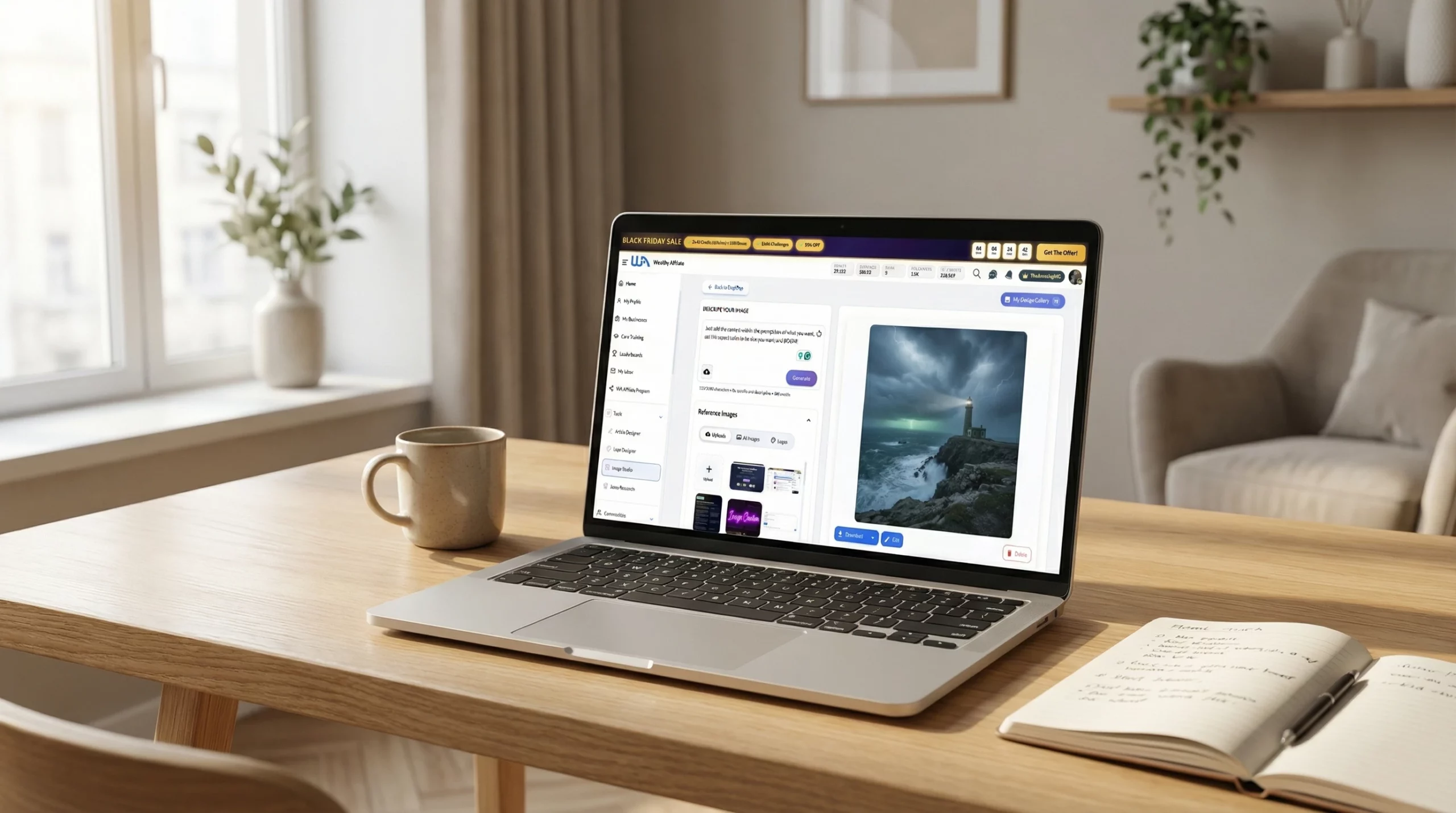
- Wealthy Affiliate Image Studio is a beginner-friendly way to make content visuals fast.
- Wealthy Affiliate Image Studio Review: Is It Actually Useful For Beginners?
- What Is Wealthy Affiliate Image Studio and How Does It Work?
- Wealthy Affiliate Image Studio Features in Action
- Pros, Cons, and Honest Opinion: Is Image Studio Worth It?
- How to Get Started With Wealthy Affiliate Image Studio Today
- Wealthy Affiliate Image Studio: common questions
- My Final Thoughts
Wealthy Affiliate Image Studio is a beginner-friendly way to make content visuals fast.
- What it is: An AI image creator + editor inside Wealthy Affiliate. Type a prompt or upload a photo, then generate and edit.
- What you’ll use it for: Blog headers, Pinterest pins, YouTube thumbnails, social graphics, and simple covers.
- Why beginners like it: No design skills needed. No extra tools to juggle. Results show up in seconds.
- Best features: Quick edits (cleanup, background fixes, expand/crop), fast regen, and easy resizing into multiple formats.
- Cost basics: Uses WA AI credits. Starter includes 2,000 free credits. Paid plans include monthly credits.
- Limits: Heavy creators can burn credits fast. Complex, layer-heavy design still fits pro tools better.
Wealthy Affiliate Image Studio Review: Is It Actually Useful For Beginners?
If you are a new affiliate marketer, you probably know the feeling of staring at a blank Canva template, trying to cobble together a blog image or YouTube thumbnail that does not look awful.
That is precisely the problem Image Studio at Wealthy Affiliate tries to solve.
Image Studio at Wealthy Affiliate is an AI image creator and editor that lives inside your Wealthy Affiliate account. You type what you want, or upload a photo, pick a size or style, and it spits out ready-to-use images in a few seconds. It is built for people without graphic design experience who do not want to buy extra tools.
The search intent here is simple: you want to know what Image Studio does, how it works, what it costs in credits, and whether it is worth using for your online business.
Quick verdict: for new and beginner affiliate marketers, Image Studio is a strong “yes” and beginner-friendly as a built-in visual tool. It covers most day-to-day graphics you need, cuts out the hassle of stock photo hunting, and eliminates the need to juggle Canva, Photoshop, and random background-remover sites. Heavy design pros may still want their favorite software, but for most beginners, it is more than enough.
What Is Wealthy Affiliate Image Studio and How Does It Work?
Wealthy Affiliate Image Studio is an AI-powered image tool inside the Wealthy Affiliate dashboard. It supports content creation by generating images from text prompts or from photos you upload, then lets you edit and resize them without leaving the platform.

The flow is simple enough for an 8th grader:
- Open Image Studio inside your Wealthy Affiliate account.
- Type a short description, such as “friendly golden retriever on a beach, bright colors, for Pinterest pin,” or upload an existing image.
- Choose a style or format, for example, a YouTube thumbnail, an Instagram square, a blog header, or a custom size.
- Click generate to generate images.
- In a few seconds, you see a set of images. Pick one, edit it if you like, then download or drop it into your content.
New Starter members get 2,000 Free AI credits when they join. Those credits work across Wealthy Affiliate’s AI tools, including Image Studio, so you can create images right away without entering a card.
Paid members on Premium and Premium Plus get fresh credits every month. Image Studio uses those credits instead of a separate subscription, so there is no extra bill for “one more tool” on top of your hosting and training.
For many beginners, this setup quietly replaces stock photo sites, stand-alone AI art tools, and complex editors that take weeks to learn. Instead of creating visuals by juggling multiple programs, you can learn the content side of affiliate marketing with the step-by-step training inside Wealthy Affiliate, and create your visuals in the same place.
Key Features New Marketers Will Actually Use
Image Studio has a lot under the hood, but most beginners will spend 90 percent of their time on a few helpful features.
Prompt-based image generation
You type what you want using prompts, and the tool turns that into images. No templates, no layers to manage. For example:
“Flat lay of skincare products on a marble background for a blog header”

“Minimalist YouTube thumbnail about saving money, person holding a piggy bank, bright text space.”

This is often faster than digging for a stock photo that “kind of” fits.
Built-in editor for quick cleanups
Right after you generate an image, you can use the editing tools to:
- Remove random objects
- Clean up or blur busy backgrounds
- Expand the scene so it fits wide blog headers
- Add text overlays like “Beginner’s Guide” or “Top 10 Picks.”
- Slightly reshape elements to look more balanced
You do not have to export into a separate editor and start again. That alone saves a lot of time.
One image, many sizes
You can resize images from your chosen one into:
- Pinterest vertical pins
- Instagram or Facebook square posts
- YouTube thumbnail ratios
- Blog featured images
So you might start with a blog header, then spin out several matching visuals for social in a couple of minutes.
Support for standard formats and use cases
Image Studio is flexible enough to handle:
- Blog images and featured graphics
- YouTube thumbnails and video covers
- Pinterest pins and story pins
- Ebook and lead magnet covers
- Simple mockups for digital products or merch
- Local service graphics, such as real estate flyers or salon promos
Fast regeneration
If you do not like the first result, you just tweak the prompt and click generate again. Because it is so quick, testing a few looks for the same idea does not feel painful. On average, less than 60 seconds!
Keep your prompts simple. You don’t need fancy wording. Talk to it like you’d talk to a person. Just say what you want, and be clear about the details.
Credits, Pricing, and What You Get With Each Membership
Image Studio runs on Wealthy Affiliate’s AI credit system. You spend credits every time you generate or regenerate images. Based on recent updates, a typical whole-image generation uses a few hundred credits, allowing you to create several images from a single batch.
Here is the simple picture:
- Starter (free)
- One-time 2,000 AI credits when you join.
- Enough to test Image Studio and the writing tools with real projects.
- Premium
- Monthly cost around the regular WA Premium price.
- A recurring pool of AI credits each month, which you can use across Image Studio and other AI tools.
- You can buy extra credits if you run out.
- Premium Plus
- The standard price is higher, but long-term deals bring it down when paid yearly.
- Around 60,000 AI credits per month are included, covering a lot of image work and other AI features.
- Occasional promotions offer large one-time bonus credit pools.
There is no separate subscription for Image Studio itself. Compared to buying a stand-alone AI art tool, plus stock photos, plus a design app, having it wrapped into one membership can be cheaper, especially if you are also using the training, hosting, and other features.
Wealthy Affiliate Image Studio Features in Action
Let’s bring this down to what you will actually do with Image Studio as a new affiliate marketer trying to create content that gets traffic and clicks.
You might log in planning to:
- Publish a new review on your niche site
- Queue Pinterest pins for the week
- Upload a new YouTube video
- Polish a simple lead magnet or checklist
In each of those cases, visuals matter. Here is how Image Studio fits into everyday work.
Creating Blog Images and Pinterest Pins That Get Clicks
Say you just finished a post on “best budget camping gear for beginners.”
You open Image Studio and type:
“Cozy campsite at sunset with tent, campfire, warm colors, room for text at top, realistic style.”

You pick a wide blog header size, generate, and choose a version that feels on-brand. These original images perform better than generic stock photos. You quickly add your site name or a short phrase like “Beginner Budget Picks” using the text overlay tool.
Next, instead of starting from scratch for Pinterest, you hit resize and choose a tall pin format. You may:
- Move the text so it sits in the top third
- Slightly crop or stretch the scene to fit
- Save two or three versions with different color accents or text wording

Because regeneration is fast, you can test:
- One pin with big, bold text
- One pin that leans more on the visual
- One pin with a close-up product shot, such as a tent or backpack
Over time, you can see which style brings more saves and clicks and keep a loose “house style” for your brand. The resize feature supports building a brand with consistent visuals.
If you want to go deeper into how AI image tools work behind the scenes, there is a detailed breakdown on understanding generative AI for image creation inside Wealthy Affiliate, but you do not need that level of detail just to get results.
Designing YouTube Thumbnails and Social Media Graphics in Minutes
YouTube and social platforms are where many beginners freeze because design feels important and scary.
With Image Studio, you can:
- Choose a YouTube thumbnail format.
- Type something like “person looking surprised at laptop, bold room on right side for text, bright contrast.”
- Generate images for a few options and pick one with a clear facial expression and a clean background.
- Use the text tool to add your title hook, such as “Stop Wasting Money on Plugins.”

The same base design can be resized for:
- Instagram posts
- Facebook feed graphics
- TikTok cover images
- Community tab posts
This is where Image Studio shines for new creators. Creating visuals consistently across different social platforms gives you a professional look without opening three different apps or learning complicated layer tools.
Some links on this page are affiliate links. If you buy through them, I may earn a small commission at no extra cost to you. Thanks for supporting Wealth With Mike. It helps me keep the guides free and honest.
Building Digital Products, Merch, and Client Work With Image Studio
Once you are comfortable with basic visuals, you can push Image Studio into money-making projects.
Some practical examples:
- Ebook and lead magnet covers
Create clean covers for checklists, mini-guides, or email opt-in bonuses. A simple, bold cover can significantly boost your perceived value. - Product mockups for print-on-demand and merch
Generate simple artwork or backgrounds, then place them on shirts, mugs, or posters using mockup templates and Image Studio’s editing tools. - Client services
Use Image Studio to deliver quick wins for local or online clients, such as:- Real estate listing graphics and social posts
- LinkedIn banner refreshes or resume visuals
- Presentation covers or one-page promo sheets

Because you can move from idea to final visual in minutes, your content creation speeds up, and these tasks become real side hustles, not just personal branding chores.
If you are already looking at tools to speed up your work, it pairs well with the broader list of best AI tools for affiliate marketing beginners that Wealthy Affiliate members often discuss.
Pros, Cons, and Honest Opinion: Is Image Studio Worth It?
So, is Image Studio at Wealthy Affiliate actually good enough to build your business visuals on, or is it more of a toy?
Let’s look at both sides.
What Wealthy Affiliate Image Studio Does Well
For beginners, Image Studio hits some invaluable points:
- Extremely easy to start
If you can type a sentence, you can get a decent image. The learning curve is much lighter than Pro Tools. - Fast results
Images appear in a few seconds, so you can keep writing and publishing instead of stalling on design. - All-in-one platform
Your images, writing tools, keyword research, hosting, and training live in the same platform. That keeps your workflow simple. - High-quality visuals for content and social
Users report that Image Studio produces strong images for blogs, Pinterest, and social feeds. Many see better engagement when they switch from generic stock photos to unique visuals, which helps build a brand. - Constant upgrades
Wealthy Affiliate keeps updating the underlying models, so quality improves over time without you needing to switch tools.
For someone following the best affiliate marketing training for beginners inside WA, Image Studio feels like a natural part of the stack, complete with a supportive community. You learn what content to create, then you make images for that content without leaving the platform, all to help generate online income.
Limitations, Credit Issues, and When You Might Need Extra Tools
Image Studio is not perfect, and you will encounter limitations in certain situations.
- Credit caps for high-volume users
If you run several busy sites or produce a lot of thumbnails and pins, you can burn through free AI credits. Premium Plus eases this with a large pool, but if you constantly buy extras, your cost per image can creep up. - Prompt skills matter
While the tool is beginner-friendly, the best results still come from clear prompts. That takes a bit of practice. The good news is that you improve quickly once you see a few patterns. - Advanced design still needs Pro Tools.
For very complex, layer-heavy work (full brand books, print catalog layouts, or agency-level campaigns), you may still want Photoshop, Illustrator, or a dedicated designer. Image Studio is better at fast, good-enough visuals than pixel-perfect fine art.
You can stretch your credits by:
- Batching image creation once or twice a week
- Planning prompts around real content needs, not random experiments
- Reusing base images and just using editing tools for text or small details instead of regenerating from scratch
Who Should Use Image Studio and Who Might Skip It
Here is the simple recommendation.
Great fit for:
- New affiliate marketers building their first website and social channels
- Bloggers who want unique blog headers and pins without designer fees
- Pinterest users who need a steady stream of pins
- People selling simple digital products or done-for-you visual services
Useful, but not a complete replacement, for:
- Designers who live in Photoshop or similar tools every day
- Brands with strict, detailed design systems that need tight manual control
- Heavy creative pros who already pay for specialized AI art tools
If you are already using Wealthy Affiliate for training, hosting, and community, Image Studio slots in as your default visual tool. If you are still on the fence about the platform itself, the broader Wealthy Affiliate platform overview provides a clear overview of everything it includes, with Image Studio as one part of that toolkit.
How to Get Started With Wealthy Affiliate Image Studio Today

You do not need to “practice” for weeks before using Image Studio. The best way to learn it is to create images you actually need right now.
Simple Step-by-Step: From Free Account to First Image
Here is a straightforward path you can follow today:
- Create your free trial Starter account
Sign up and claim your 2,000 AI credits. You can start a free Wealthy Affiliate Starter account in a couple of minutes. - Open Image Studio in your dashboard
Go to the AI tools section and find Image Studio. You will see the prompt box and size options. - Pick a real project
Choose something you actually need: a blog hero image, your first Pinterest pin, or a YouTube thumbnail. This keeps you focused. - Write clear prompts
Describe the subject, mood, and use. For example, “Minimalist flat lay of home office desk, light colors, for productivity blog header, space for title text at top.” - Choose the format and generate.
Select the correct size (blog header, pin, thumbnail) and click generate. Review the options, pick one you like, then improve it with the editor. - Resize and reuse
Turn that same base image into at least one other format, such as a Pinterest pin or Instagram post, so you see how far one idea can go.
After you do this a few times, Image Studio will feel like a regular part of creating content at Wealthy Affiliate, not an extra chore.
Wealthy Affiliate Image Studio: common questions
Do I need design skills to use Image Studio?
Can Image Studio replace Canva for a beginner?
How do the AI credits work for Image Studio?
What image sizes can I create?
What edits can I do after I generate an image?
What should I put in my prompt to get better results?
Will I run out of credits fast?
Can I use the images for my blog, YouTube, and client work?
My Final Thoughts
Image Studio in Wealthy Affiliate gives beginners a straightforward way to create custom images without leaving the platform. It is an AI-powered image creator and editor that covers blog headers, pins, thumbnails, product visuals, and simple client work, all from simple text prompts or quick uploads.
The people who benefit most are new affiliate marketers who struggle with design and do not want to juggle Canva, Photoshop, stock sites, and separate AI tools. The credit system, especially on Premium Plus, gives plenty of room for regular content creators, and the built-in editor (including background removal, resizing, and fast regeneration) keeps your workflow simple.
There are limits, mostly around credit caps for very heavy users and cases where advanced design still needs Pro Tools. Even with those gaps, Image Studio is a strong, practical visual engine for your first online business affiliate sites.
If you are starting and you want your content to look better without turning yourself into a designer, Image Studio is well worth using as part of your Wealthy Affiliate toolkit and supportive community.
Wealthy Affiliate Image Studio removes the biggest friction beginners face with content creation. It lets you create clean, usable visuals fast, inside the same platform where you learn and publish. If design slows you down or keeps you from posting, this tool keeps you moving.
Start Your Free Trial Today
Build your first site. Use your free $10 in AI credits. See results this week.
Join Wealthy Affiliate Free Trial